
Help
FAQ
Orders
How can I track my order?
You can track your order online by visiting our Track Order page. Just enter your order number and the email address used at checkout.
What does it mean if my order status is “Cancelled”?
This means we were unable to locate the item(s) in your order. You have not been charged.
To place a new order, visit Journeys.ca or call us at 1-855-472-0435.
How can I contact Journeys Customer Service?
You can reach us using any of the Contact Us options on our website.
We’re available:
- Monday–Friday: 7am–9pm CT
- Saturday: 8am–8pm CT
- Sunday: 10am–7pm CT
What does “In Process” mean for my order?
Your item(s) are being located and prepared for shipping.
Please check back soon or watch your email for your tracking number.
What happens if my order is “Refunded”?
We couldn’t locate the item(s) in your order and have issued a refund.
- Online orders: Refunds take 3–5 business days to appear on your credit card or gift card.
- In-store orders: Refund checks may take 2–4 weeks via Canada Post.
To request a refund to your original credit card, call 1-855-472-0435.
What does “Return Created” mean?
Your return has been processed.
- Credit card payments: Refunds appear within 3–5 business days.
- PayPal payments: Refunds may take up to 30 days. For help, contact PayPal Support.
- Exchanges: You’ll receive a confirmation email within 2–5 days.
What does it mean if my order is “Scheduled”?
Your order is currently processing. Please allow 1–2 business days. If shipping from a store, allow an additional 3 business days.
Check your email for order and tracking updates.
What does “Shipped” mean?
Your order is on the way!
If you don’t see a tracking number yet, it should arrive via email within 24 hours.
You can also find it in Order History under My Account or on the Track Order page.
How can I track my order?
Once you submit your order online or over the phone, we will issue you an order number. When your order is shipped, we will email you a confirmation with your tracking number and carrier information.
To track your order, use your order number and billing postal code with our online tracking tool here: Track Order.
If your order has shipped, you can click on the tracking number to sign up for text updates about your delivery.
Can I change or cancel my order after placing it?
Once your order is submitted, we begin processing it immediately to get your items shipped as quickly as possible. Because of this, changes or cancellations cannot be made once the order has been placed. For quick and easy returns or exchanges, visit your local Journeys store. Please refer to our Return/Exchange Instructions for more information.
What should I do if my package is lost?
If you think your package is lost, please follow these steps:
- Check the tracking information: Use the tracking number from your shipping confirmation email to verify the status of your package.
- Contact our customer service: If the tracking shows no movement for 3 business days or indicates the package is damaged in transit, please contact our customer service team. Be sure to include your order number and any relevant details.
How long should I wait before reporting a lost package?
If you have not received your package, we recommend waiting 3 business days from the expected delivery date before reporting it as lost. This allows time for any potential delays in transit.
What if the tracking information says my package was delivered, but I have not received it?
If your package is marked as delivered but you have not received it, try the following:
- Check with household members: Someone else may have accepted the package on your behalf.
- Look around your property: Check porches, side or back doors, garages, or other secure areas.
- Check with your apartment office or mailroom: Carriers may leave packages in these locations.
If you still cannot locate your package, please contact our customer service team for further assistance.
Please note: We are not responsible for lost or stolen packages after they are marked as delivered by the carrier, or for packages damaged after delivery due to weather (rain, snow, heat exposure, etc.), animals, or other environmental conditions, except where prohibited by law. For added security, consider using our Buy Online, Pick Up In Store, Ship to Store, or FedEx Hold at Location options.
How do I place an order online?
To find a specific item, use the search box at the top right of the page and enter the style name or style number. If you're browsing, explore our product categories using the top and side navigation menus.
Once you find something you love, add it to your shopping bag. When you're ready to check out, click the shopping bag icon in the top right corner and select CHECKOUT.
Prefer to order by phone? Call us at 1-855-472-0435 and we’ll be happy to place the order for you.
How can I view my order history?
To view your order history, you’ll need to sign in to your online account. All orders placed while logged in will be visible in your account dashboard.
Don’t have an account? You can create one or log in here.
How do I track my order?
After placing your order, you’ll receive a confirmation email with your order number. Once your order ships, we’ll send another email with your tracking number and carrier details.
- Go to the Order Tracking page.
- Enter your order number and postal code.
Note: Tracking information may take up to one business day to appear after your order ships.
If tracking details are still unavailable and your expected delivery date has passed, please contact us for assistance.
What should I do if I received the wrong item?
We sincerely apologize for the mix-up! We make every effort to carefully check each parcel before it ships.
If you received the wrong item, you have two options:
- Visit your local Journeys store in Canada for a quick refund or exchange.
- Contact our customer service team at 1-855-472-0435 so we can send you the correct item as quickly as possible.
What forms of payment are accepted at Journeys, both in-store and online?
For online orders, Journeys accepts the following payment methods:
- All major credit cards (Visa, MasterCard, American Express, Discover)
- PayPal, Apple Pay, Google Pay, Venmo, Afterpay, Klarna, and Cash Apple Pay
- Journeys gift cards
- Visa, MasterCard, Discover, and American Express gift cards
When placing an order online, we must be able to verify the billing and shipping addresses with your credit card company. If verification is unsuccessful, you will be notified at checkout.
For in-store purchases, we accept:
- All major credit cards (Visa, MasterCard, American Express, Discover)
- Journeys gift cards
- Cash and debit cards
- Mobile payment options such as Apple Pay and Google Pay
Please note: We do not accept C.O.D. orders or any gift cards not listed above, including mall gift cards.
Is it safe to place an order on the Journeys Canada website?
Yes, Journeys Canada is a safe and secure website. We use up-to-date security measures to ensure your information is protected while shopping.
If you prefer not to place your order online, please contact our Customer Service team at 1-855-472-0435, and we’ll be happy to help you complete your purchase.
Products
How do I search for an item on Journeys.ca?
To find an item on Journeys.ca, click the magnifying glass at the top of the page and type in the style name or style number. If you’re just browsing, use the top navigation to explore categories like Brands, Men, Women, Kidz, and Sale.
How do I create and share a wishlist on the Journeys website?
Create and share a wishlist for any occasion. Sign in or create an account, choose your size, and click 'Add to Wishlist' on the product page.
To view or share your wishlist, go to your account and click 'Wishlist & Saved for Later.' You can email your wishlist to up to 3 friends or family members.
Does Journeys offer price matching?
At this time, Journeys does not offer price matching on any products.
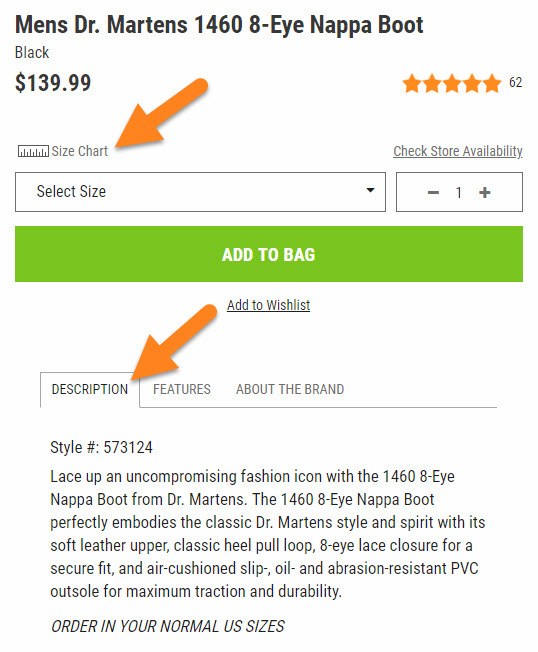
When viewing the item, simply click on Check Store Availability.
From there, choose your Size and Postal Code to see if the item is available in a store near you!
To find a retail store near you, please use our Store Locator!
How do I choose the right size when ordering Dr. Martens?
Dr. Martens are manufactured in UK sizes, but when ordering from Journeys.ca, you should select your US shoe size.
For more sizing guidance, please view the Size Chart or read the "Description" tab on the product page.
Shipping & Delivery
What is the Journeys All Access program?
Journeys All Access is our free loyalty program. Members in Canada enjoy benefits such as free standard shipping on all orders. Excludes Newfoundland and Labrador.
Do members receive free shipping?
Yes. Members of the Journeys All Access program receive free standard shipping (excludes Newfoundland and Labrador). Non-members are charged $7.99, or $14.99 for orders shipping to Newfoundland.
How long does standard shipping take?
Standard shipping via FedEx Economy typically takes three to five business days.
Do you offer express or international shipping?
No. Journeys Canada does not offer expedited or international shipping at this time.
Are there any shipping restrictions?
Yes. Journeys Canada does not ship to Nunavut, Yukon, or the Northwest Territories. Additionally, we do not ship to international freight forwarding companies or hotels.
Does Journeys ship Internationally?
At this time, Journeys only offers shipping within the United States and Canada.
For U.S. orders, please visit: Journeys.com
For Canadian orders, please visit: Journeys.ca
For joining Journeys ALL Access, members receive FREE ground shipping. Excludes Newfoundland and Labrador.
Ground shipping is $7.99 for non-members, or $14.99 for orders shipped to Newfoundland.
*Standard ground shipping only. Shipping time frame is 3-5 business days.
Can I place an order in a Journeys Canada store?
Yes! You can visit any Journeys Canada retail location to place an order. Use our Store Locator to find the nearest store. If you’ve already placed your order in-store, you can track your order here.
Special Order Shipping Options:
Standard Ground Shipping: Free, 3–5 business days. Orders shipped to Newfoundland and Labrador are subject to a $9.99 shipping fee.
Silver Shipping: $17.99, 2–4 business days
Gold Shipping: $24.99, 1–2 business days
Warehouse to Store: Free, 10–14 business days
Can Journeys ship to P.O. boxes?
At this time, Journeys cannot ship to P.O. boxes. Please provide a valid street address when placing your order.
What does it mean when an item is marked as "Will Ship from Store"?
This status means the item is not available in our warehouse, but it is available at one of our retail store locations. Your order will be fulfilled directly from a store instead of our central warehouse.
Can I choose expedited shipping for items that ship from a store?
No, we cannot offer expedited shipping (such as Overnight or 2-Day delivery) for items that ship from a store. Coordinating fulfillment between our stores and the shipping carrier takes additional time, which prevents us from guaranteeing faster delivery.
Why won’t the website let me select expedited shipping at checkout?
If all items in your Shopping Bag are either:
- Marked as "Backordered", or
- Set to "Will Ship from Store",
then the expedited shipping options will be disabled at checkout. This is because we cannot guarantee expedited delivery for items not in stock at our warehouse.
Order Pickup Options
What are the pickup options available at Journeys?
Journeys offers the following convenient pickup options for your order:
Buy Online, Pick Up in Store – Reserve your item online and pick it up at a nearby store.
Buy Online, Ship to Store – Have your order shipped to a Journeys store for pickup.
What payment options are available for Buy Online Pick Up in Store and Buy Online Ship to Store?
For both Buy Online Pick Up in Store and Buy Online Ship to Store, Journeys accepts:
- All major credit cards
- Journeys gift cards
- PayPal
- Venmo
- Klarna
- Apple Pay
Note: Google Pay (GPay) is only available for home delivery orders.
How will I know when my order is ready for pickup?
Once your store order is placed, you’ll receive an email with pickup instructions. When your order is ready, you’ll get a “Ready for Pick Up” email. Please wait for this email before going to the store.
Can I get same-day pickup?
Yes, same-day pickup is available at most Journeys locations if your order is placed by:
- 5 PM (local time) Monday–Saturday
- 3 PM (local time) on Sunday
Orders placed within 2 hours of store closing will be ready the next business day. Please check your selected store’s hours here.
How long will my order be held at the store?
Orders will be held for up to 5 business days after they are ready for pickup. If not picked up within that time, the order will be canceled.
Is there a fee for in-store pickup?
No, there is no fee for in-store pickup orders.
Will I receive a notification by phone?
Yes. If you provided a mobile number, you’ll receive an SMS when your order is ready.
Are there times when pickup options may be unavailable?
Yes. During high-volume shopping periods like Black Friday and Cyber Monday, Buy Online, Pick Up In Store and Buy Online, Ship to Store options may be temporarily unavailable.
Note: Not all Journeys stores may appear as pickup options during checkout.
How does Buy Online, Ship to Store work, and are there any limitations?
When you choose the Buy Online, Ship to Store option, your order will be shipped to a Journeys store at the standard Ground Shipping rate, unless you are a Journeys All Access loyalty member, in which case shipping may be free. Orders are typically ready for pickup within 3–5 business days.
Expedited shipping is also available for eligible orders. Please note that during high-volume shopping periods, such as Black Friday and Cyber Monday, the Buy Online, Pick Up in Store and Buy Online, Ship to Store options may be temporarily unavailable. Journeys CA does not offer FedEx Hold at Location as a shipping option.
What do I need to bring when picking up my order from the store?
Bring your order confirmation when picking up from the store. If someone else is picking it up, give them a copy of the order confirmation.
Can I pick up my order in store?
All items in an order must be the same order type to be eligible for in-store pickup. If not all items are available to ship or pick up from the selected location, the order will default to home delivery. Items marked as “In Select Stores Only” are not eligible for Buy Online, Pick Up in Store, but you can check with your local store for availability and purchase those items directly in-store. Items that ship from the manufacturer are also not available for in-store pickup.
Can I use FedEx Hold at Location for my order?
No, Journeys Canada does not offer FedEx Hold at Location as a shipping option. If your order is not eligible for pickup, it will be shipped to your home at the standard Ground shipping rate, unless you are a Journeys All Access loyalty member.
Journeys All Access & Promotions
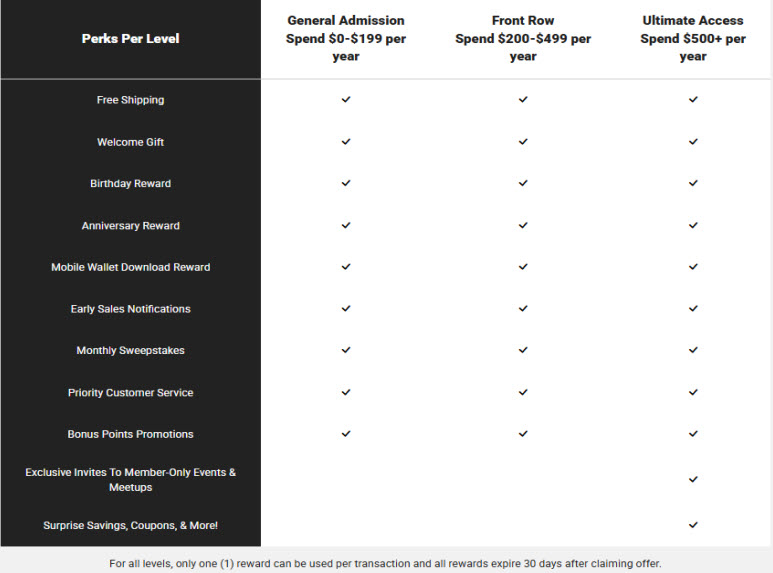
What are the current Journeys All Access program benefits?
How do I become a Journeys All Access member?
Join using any of the following methods:
• Online at Journeys.ca
• In-store with a sales associate
How do I opt-in to receive text notifications from Journeys All Access?
Text JOIN to 20101 to sign up via SMS
When I create my account, do I automatically start saving?
Yes! New members receive a $10 off $75 welcome offer. Check your email after signing up to start saving.
What are the Journeys All Access tiers?
Journeys All Access has a 3-tier structure based on how much you spend in a 12-month period:
• General Admission: $0–$199/year (entry tier at sign-up)
• Front Row: $200–$499/year
• Ultimate Access: $500+/year — includes all previous tier perks plus exclusive offers and 2x points on every dollar spent
Your tier is automatically updated based on your annual spend.
What is the point earning structure?
• General Admission & Front Row: 10 points per $1 spent
• Ultimate Access: 20 points per $1 spent
Points expire 12 months after they are earned.
How many points do I need to turn points into coupons?
• $5 Off = 1,000 points
• $10 Off = 2,000 points
• $15 Off = 3,000 points
• $20 Off = 4,000 points
How do I earn points?
Every purchase you make in-store or through www.Journeys.ca earns you points! Each completed purchase will earn 10 points per dollar for both General Admission and Front Row members. Ultimate Access members earn 20 points per dollar. Points are determined after any discounts are applied pre-tax. The more dollars spent, the more points earned!
Additional points can also be earned by participating in point multiplier campaigns, completing surveys and downloading your mobile wallet pass.
How do I redeem points for rewards?
To redeem your points, log into your account at Journeys.ca, view your Journeys All Access dashboard and claim the reward you would like to use.
To apply the reward for online purchases, simply enter the promotion code during checkout. Each claimed reward has an individual bar code for quick scanning with in-store purchases.
If you download your mobile wallet pass to your device, each claimed reward can also be found on the back side of your pass for your convenience.
How can I use my points?
You can redeem your points for dollar-off rewards (coupons), access to sweepstakes, exclusive invites, surprise savings, and more!
Please note: Points redeemed for sweepstakes entries or rewards are final and cannot be reversed, refunded, or credited back to your account.
Can I cash in my points or rewards for something else?
At this time, points may only be redeemed for rewards, access to sweepstakes and exclusive invites.
Do points or rewards expire?
Points are valid for 12 months from the date they are earned. Rewards/coupons will expire 30 days after they are claimed.
Can I use my points to buy items in-store and online?
Yes, points can be redeemed for rewards/coupons and applied toward in-store and online purchases.
How do I see my available points?
Available points can be viewed on the Journeys All Access dashboard or by downloading your Mobile Wallet Pass.
Is there a limit to the number of points I can earn in a calendar year?
At this time, there is no limit to points earned. Effective October 15, 2025, Journeys All Access will implement a point cap of 10K per month (120K annually), separated into two (2) activity types:
1. Purchase/Transaction activity: Max of 8K points/month
2. Engagement activity: Max of 2K points/month
The caps will reset on the 1st of every month. Multiplier campaigns (2x, 3x points) will be excluded from the 10K/month cap.
If I cancel an order, what happens to my points?
Points are only awarded after your full order ships. If you cancel before it ships, no points will be added.
Can I return items and keep my points?
If you return an item for a full refund, the points earned will be removed. For exchanges, points are adjusted based on the price difference. If you used a reward or coupon on the returned item, those points will be credited back to your account. Please allow up to 24 hours for changes to appear.
Can I get points for purchases made before joining Journeys All Access?
Yes. You can receive points for purchases made up to 7 days before joining. For help, contact Customer Service at 1-855-472-0453.
I forgot to tell the store I was a Journeys All Access Member. Can I still get my points for that purchase?
Yes. If you provided the email address linked to your Journeys All Access profile at checkout, your points will be added automatically. If you used a different email, contact Customer Service at 1-855-472-0435 for assistance.
Can my points still be applied if I put in the wrong email address?
Yes. If the incorrect email address was provided, please contact our Customer Service department at 1-855-472-0435 for assistance.
Are my points automatically applied to my dashboard?
Yes. Points are automatically added within 24 hours after your order ships or, for in-store purchases, within 24 hours of your visit.
How long do I have to use my reward once I claim it?
Rewards expire 30 days after they are claimed.
How do I track my points?
Your points and rewards are tracked automatically. When you make a purchase using the email linked to your membership or complete activities like surveys, points are added within 24 hours.
You can check your current point balance anytime by:
• Logging into your loyalty account at Journeys.ca
• Viewing your mobile wallet pass (points appear in the top right corner)
How do I view my account information?
Sign into your account to access your dashboard, where you can view your points, rewards, and membership details.
What should I do if my points aren’t showing in my dashboard?
Points are added within 24 hours after your order ships or after an in-store purchase. If your points are still missing after that time, contact Customer Service at 1-855-472-0435 for help.
How do I complete a survey from my dashboard?
Log in to your account at Journeys.ca, then:
1. Click the green “View Rewards” button under your tier and points
2. Select “Earn More” under your tier and points
3. Click “Begin Survey”
How do I download my mobile wallet pass from my dashboard?
Log in to your account at Journeys.ca, then click “Add pass to Wallet” below your member ID barcode.
• For iPhone: Follow the Apple Wallet instructions
• For Android: Follow the Google Pay instructions
I already have a Journeys.ca account. Do I need to create a new one?
All existing accounts can opt-in to the Journeys All Access membership.
What if I have two accounts? Can I combine them?
Journeys All Access can only be linked to one account. To combine accounts, please contact Customer Service at 1-855-472-0435.
I forgot which email I used during sign-up. How can I find out?
Contact Customer Service at 1-855-472-0435 for help identifying the email linked to your membership.
I forgot my account password. What can I do to make sure I get my points?
Use the “Forgot Password” link on the Journeys.ca sign-in page to reset your password. If you need help, contact Customer Service at 1-855-472-0435.
I no longer have access to the email I used during sign-up. Can I change the email and keep my points?
Yes. Log in at Journeys.ca, click “Edit Information” under your profile, update your email, and save. Your points and rewards will remain unchanged. For help, contact Customer Service at 1-855-472-0435.
I changed my phone number. Do I need to update it?
Yes, keeping your phone number current ensures a smooth experience and uninterrupted perks. To update it, go to your Journeys All Access dashboard, click “Edit Information” in the Profile section, enter your new number, and click “Update Profile.”
I entered my child’s birthday info wrong. How can I change this?
To correct it, click the “Remove” button next to the incorrect birthday, then add your child again with the correct date under “Kidz Birthday Preferences” by clicking “Edit Information” and “Submit.” For help, contact Customer Service at 1-855-472-0435.
How do I sign up to get promo codes and updates from Journeys?
Stay in the loop with the latest styles, promotions, and exclusive offers by signing up for Journeys emails and texts!
Email: Click here to sign up for promotional emails.
Text: Text JOIN to 20101 to receive promotional text messages. Message and data rates may apply.
Only one promo code is allowed per transaction. You can opt out anytime.
How can I use a promo code on Journeys.ca or in-store?
Online: When reviewing your Shopping Bag, enter your promo code in the Order Summary section and click "Apply". Make sure the code is entered exactly as shown. Only one promo code can be used per transaction.
In-Store: If your promo code includes a barcode, present it—either printed or on your mobile device—to a store associate at checkout. They’ll scan it to apply the discount. Only one promo code can be used per transaction.
Does Journeys still offer a Birthday Club discount through the Journeys All Access program?
Journeys no longer offers a separate Birthday Club. Birthday rewards and special offers are now part of the Journeys All Access loyalty program. When you enroll, you’ll receive exclusive perks — including birthday offers — directly through your loyalty dashboard.
You must be 13 years of age or older to join. To sign up or learn more, visit the Journeys All Access page.
What is Student Beans?
Student Beans is a program that provides students with exclusive discounts and offers when they verify their student status.
How do I verify my student status with Student Beans?
To verify, create a free Student Beans account and follow the steps to confirm your eligibility. Once verified, you’ll be able to access discounts for our products.
Who is eligible for Student Beans?
Current students with a valid school email or official documentation showing active enrollment.
How do I use Student Beans on your site?
When shopping online, log in through Student Beans to receive your discount code. Enter the code at checkout to apply your savings.
How do I get my military discount?
The easiest way is to stop by one of our stores!
Our team will help you scan a quick QR code, verify through ID.me, and get your discount on the spot.
You can use your discount at Journeys stores across Canada.
What is ID.me?
It’s a quick and secure way to verify your military status and unlock your discount.
What’s the discount?
You’ll get 10% off your purchase with a one-time use code.
How often can I use it?
You can grab up to 3 codes each month.
Does my code expire?
Yes — codes are one-time use and expire 7 days after they’re created, so be sure to use them soon!
Can I use the discount online?
You can! Once your code is generated, just enter it at checkout. But if you want the smoothest experience, we’ve got you covered in-store.
Can Journeys send me a new code if mine doesn’t work?
No — Codes are generated through ID.me, so they’ll need to help with anything related to your code.
Having trouble with ID.me?
Head over to help.id.me — their team can walk you through anything you need!
Returns & Exchanges
What is Journeys' refund and exchange policy?
Journeys Canada allows returns or exchanges within 60 days of purchase for merchandise in new condition, with original packaging and valid proof of purchase (receipt or online confirmation). Shipping charges are not refundable.
For orders placed before April 1, 2026, the return policy in effect at the time of purchase will apply. These orders may be returned or exchanged within 365 days of the original purchase date, as long as all other return policy requirements are met. Orders placed on or after April 1, 2026 are eligible for return or exchange within 60 days of the original purchase date.
In-store: Bring your item(s) and proof of purchase to any Journeys Canada store. Use our Store Locator to find a location near you.
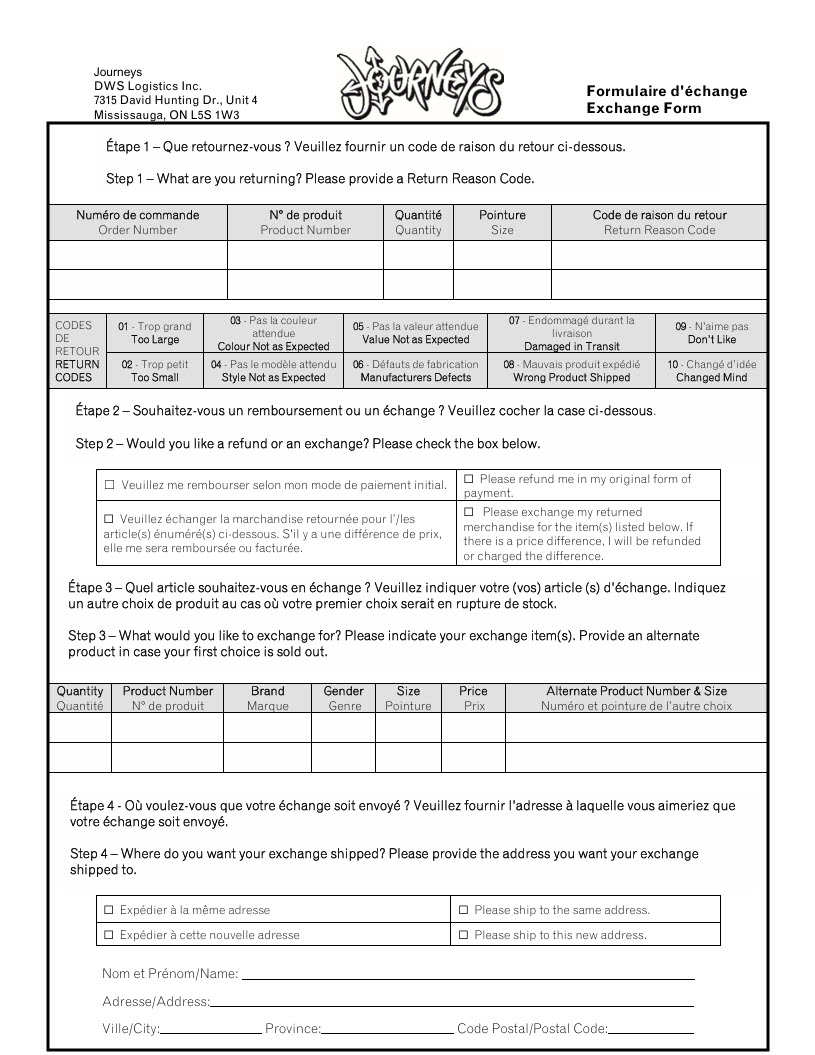
By mail: Ship your return using the carrier of your choice, along with a completed Return/Exchange Form, to:
DWS Logistics
7315 David Hunting Dr., Unit 4
Mississauga, ON L5S 1W3
Please allow 2–4 weeks for processing. We recommend using a trackable shipping method.
What is Journeys' policy on defective returns and exchanges?
We guarantee all products against manufacturer defects within 30 days of purchase. We reserve the right to determine whether merchandise is defective and to either replace or refund the item if necessary.
Returns or exchanges will be accepted with your original receipt, online receipt, or other valid proof of purchase. Merchandise must be returned in its original packaging. If your item is defective, please contact us for support.
What happens to my points if I return or exchange an item?
Points for purchases are not awarded until your order has shipped in full.
If you return an item for a full refund, the points earned from that purchase will be automatically deducted from your account.
If you exchange an item, your points will be adjusted based on the price of the new item:
If the new item is less expensive, points may be deducted.
If the new item is more expensive, additional points may be awarded.
How do I download the Return/Exchange Form for Journeys?
To download the form, follow these steps:
- Right-click on the form image below.
- Select “Save as Image.”
- Click the download notification at the bottom of your browser to open or save the file.
What if I didn’t receive a receipt or invoice with my order?
To support our goal of going green, Journeys no longer includes physical receipts or invoices in the box for online or in-store orders.
To return or exchange an item in-store, simply use your order confirmation email as your proof of purchase.
If you experience any issues due to the lack of a physical receipt or invoice, please contact us—we’re happy to help!
What happens if my package is returned to Journeys by the courier?
If your package is not successfully delivered and is returned to Journeys by the courier, we will issue a refund for the merchandise once it is received back at our facility.
Please note that the original shipping fee is non-refundable.
When will I receive my refund after returning an item?
In-store returns: Once your return is accepted in-store, your refund will be processed to your original method of payment. It should appear on your statement within 5 to 7 business days.
Returns by mail: After your return is received at our warehouse (typically within 3 to 5 business days of being picked up by the courier), your refund will be processed. Please allow 5 to 7 business days after receipt for the refund to appear on your credit card statement.
Note: Shipping charges are non-refundable.
Gift Cards
Where can I buy a gift card?
- Physical gift cards are available for purchase in-store at any Journeys retail location.
- eGift cards can be purchased online and are delivered via email to the recipient.
- Click here to purchase an eGift card
- Gift cards are not available for purchase over the phone.
What are the shipping details for gift cards from Journeys?
Shipping for physical gift cards is free! Express shipping will vary by location and will be calculated during checkout. Gift cards are available in any amount up to $250. To purchase a physical gift card, click here!
With eGift cards, Journeys emails the gift card and pin number to your or your designated recipient. EGift cards do not incur shipping charges. You will receive this email within 1 hour of purchase, unless a future delivery date is chosen This email will be received by the end of the next business days. eGift cards are redeemable online and in-store. eGift are available in any amount up to $250. To purchase an eGift card, click here!
How can I use my gift card?
- Gift cards can be redeemed online or in-store.
- To use online, enter the 16-digit card number and PIN at checkout under the Billing Address & Secure Payment section.
- You may use up to two gift cards per online order. To use more than two, please call 1-855-472-0435.
What is the maximum amount I can load onto a gift card?
Gift cards can be loaded with any amount up to $250.
How can I check my gift card balance?
You can check your balance here.
Just enter your card number and PIN, then click Check Gift Card Balance.
When will I receive my eGift card?
eGift cards are emailed to the recipient within 1 hour of purchase, unless a future delivery date is selected.
If you haven’t received it, check your spam/junk folder or email filters.
Still missing? Contact our gift card support at 1-844-243-4129 or email [email protected].
What if I lose my gift card?
Unfortunately, lost or stolen gift cards cannot be replaced.
Do gift cards expire?
No. There are no fees or expiration dates on either physical or eGift cards.
Are gift cards refundable?
Gift cards are non-refundable once issued.
If you’re having trouble using your gift card online, contact us at 1-855-472-0435.
For eGift card delivery issues, contact 1-844-243-4129 or email [email protected].
What happens if I return an item purchased with a gift card?
Refunds are issued to the original payment method. If you used a gift card, the refund will be credited back to that gift card.
Keep your gift card until you’re sure you’re satisfied with your purchase.
If you no longer have the card, contact us at 1-855-472-0435.
Gift cards cannot be redeemed for cash or used to pay credit card balances.
What are the terms for purchasing and using Journeys gift cards?
Gift cards cannot be redeemed for cash or used to pay credit card balances. No variance from these terms will be allowed except in such provinces that require redemption for cash.